Construction project management software
Construction project management for site and office
Plan quantities, control project costs, record daily site work, prepare progress payments and view IFC models in one workspace built for construction teams.
- First user of every project is free
- Runs in the browser — nothing to install
- Excel import & export for quantities and contracts

Progress payments
Never prepare the same payment twice
Work done on site adds itself up. Enter what was built and the client progress payment, the earned revenue and the remaining contract value are all calculated from the same numbers — no spreadsheet to reconcile at month end.
- Client and subcontractor payments use the same measured quantities, helping keep both calculations consistent
- Previous periods are remembered — you only enter what was done this month
- Export the payment the day the work is measured

3D model · IFC
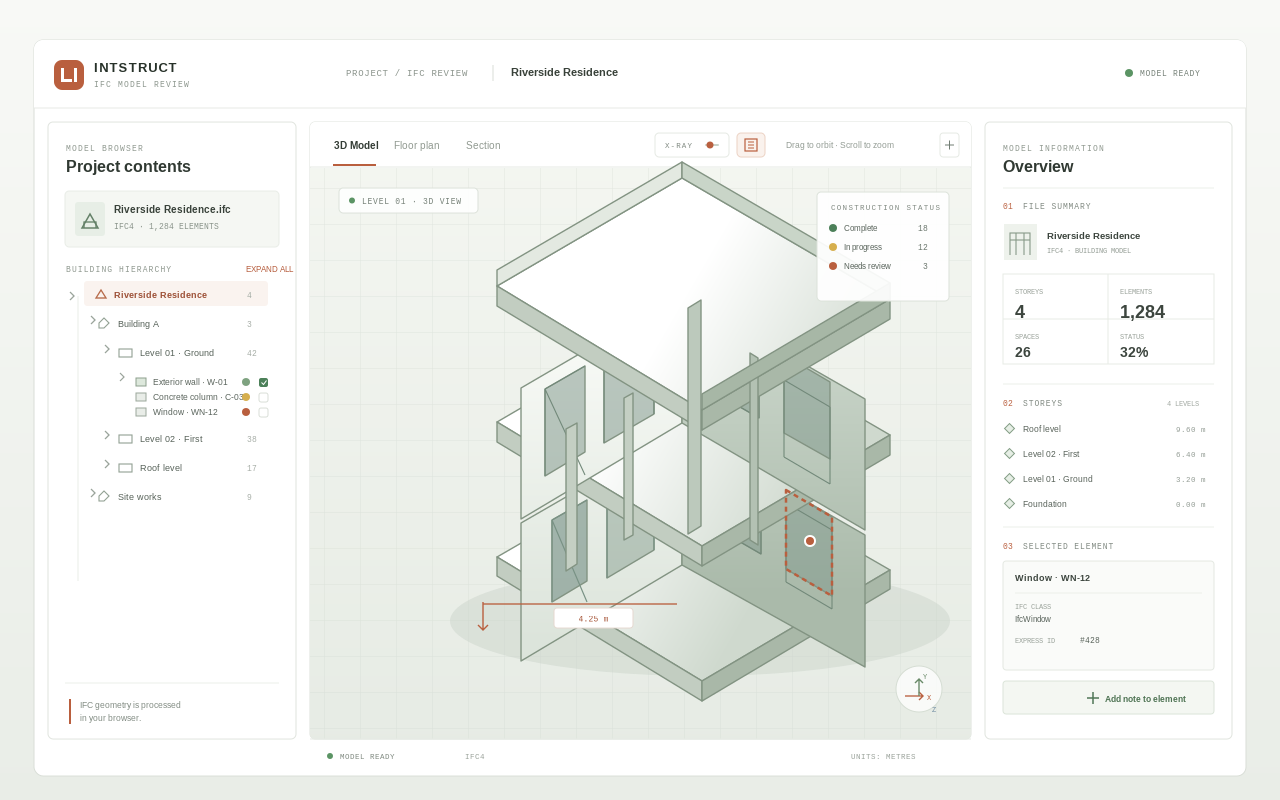
Open the model on site, not only in the office
The building’s IFC model opens right in the browser. Measure an element on site, pin a note to it, and the next person finds your note in exactly the same place — no desktop software, no downloads.
- IFC models open in the browser — nothing to install
- Measure and mark elements without leaving the page
- Notes and measurements stay attached to their element
Field data
Let the site write its own daily report
Labour, equipment, materials, progress and expenses are entered from a phone, where the work happens. Every record lands on the right budget line, so the office sees real figures — not a late summary.
- Daily labour and equipment records feed cost control automatically
- Entered on site, not compiled afterwards
- Photos and documents stay attached to the day they belong to

Cost control
Learn the cost while you can still act
Budget, actual and committed costs sit side by side for every item. When a line starts drifting from plan, the dashboard says so while there is still time to intervene — not after the invoice arrives.
- Budget, actual and committed cost per item, with the variance next to them
- Earned-value metrics (CPI, SPI) flag a drifting item early
- Cash-flow curves can be drafted straight from the work schedule

Product tour
See one project come together
A narrated tour from planning and site records through IFC, cost control, and reporting.
Try the Android IFC viewer beta
Install the early mobile prototype and try its IFC viewer. Project files and notes stay on your device; this test app does not sync them to the intstruct website.
Version 0.1.0 · Android 64-bit · beta test build · signed with a debug key
Test software, not a Google Play or production-signed release. Android may ask you to allow installation from your browser. Install only if you trust this source; verify the checksum before opening the APK.
Key features
One workspace, every module
Every module reads the same project records: data is entered once — usually on site — and is reused everywhere else.
Quantity take-off
Budget control
Cash flow
Progress payments
Field data
Cost entry
Manhour analysis
Schedule
3D IFC viewer
Quality & HSE
Contracts & claims
Procurement & stock
Reports
AI assistant
Why intstruct
Built around how a construction project actually runs.
One record, not eleven spreadsheets
Written for the people doing the work
Project records stay organized
Free to start, fair to grow
Frequently asked questions
Is intstruct used on site or in the office?
Both. Field screens are filled in from a phone: daily labour, equipment, progress and expense records. On the office side, the same records turn into budgets, cash flow and progress payments automatically. Data is entered once, on site, and used everywhere.
Can I move my existing project over from Excel?
Yes. Quantities can be typed in or imported with the Excel-compatible template you can download from the app, and contracts can be imported from a CSV file. After the move, everything is updated inside intstruct.
Are progress payments really calculated automatically?
Yes. Measured quantities and contract unit prices calculate the payment, earned revenue and remaining contract value. Client and subcontractor payments use the same measured quantities, helping keep both calculations consistent.
What do I need to view the 3D model?
Just a browser. IFC models open without any desktop software. You can measure elements and pin notes to them; the notes stay attached to the element for the next person who opens the model.
How does pricing work?
The first user of every project is free. Each additional user in the same project costs 10 USD per month. There is no fixed term and no hidden fee — the price simply follows your user count.
Where is my data stored, and is it safe?
Project records are grouped by project. Storage, backups, retention and access controls depend on the deployment, so confirm those details with your administrator before adding sensitive information. Advanced role-based access controls are still in development.
Do we need training to get started?
No. The built-in user guide walks through every module step by step — from creating the project to exporting a report — in plain language written for site engineers and project managers.
What does the AI assistant do?
It can answer questions about project progress, costs and records. Your API key stays in the current browser tab and is forwarded with requests. If you include project context, that summary and your conversation are sent through the configured backend to the selected AI provider. Review the provider’s privacy and retention terms before sharing sensitive information.
How large can my files be?
PDF documents such as specifications upload up to 40 MB each. IFC models up to 48 MB can be uploaded and processed in the project workspace.
Does intstruct work offline on site?
The app needs an internet connection today. On sites with weak reception, a phone hotspot is enough for daily records — they are small text entries, not heavy file transfers. Offline queueing of field records is on the roadmap.
Can I export my data?
Quantities can be exported to Excel-compatible files, and reports can be generated as PDFs. Export options vary by module; check the user guide for the formats each area supports.
Start with your current project
The first user of every project is free. Create an account and open your first project — or read the documentation first if you would rather look around.